As you know, Windows 8.1 will officially be released on October 18th. You discovered in videos new tile sizes, new possibilities to customize your Start screen, the come back of the Start button, new apps and app updates. Zac Bowden from WinBeta.org released on September 5th a complete review of all the essential updates between Windows 8 and Windows 8.1.


Here is the list of these apps updates shown in the video :

• MAIL : new tile color (blue) ; possibility to move the mails received on folders ; social mails folder regrouping mails from Facebook, Twitter, Google ...
• CALENDAR : New home page showing in chronological order the next events.
• PHOTOS : similar to Windows 8 including photos from SkyDrive.
• XBOX VIDEO : Similar to Windows 8 but with dark grey background.
• XBOX MUSIC : New interface pushing your collections of music, including an explorer for millions of songs and a list of radios.
• STORE : New UI including popular apps in the left and "Picks for you" ; app info is now more complete, infos, screenshots, notes given, price, comments and so on
• SKYPE : now integrated to Windows 8.1 when you install the OS. Same features like on Windows 8.
• PEOPLE : New UI with last notification on the left, social updates, favourite contacts and contacts list.
• INTERNET EXPLORER : Tabs on the bottom when you click right, above address bar ; access in this part of the screen for Frequent, favourite websites and downloaded files.
• HELP AND TIPS : new app for Windows 8.1 to understand the main features and ways to use the OS.
• FOOD AND DRINK : presented at Build Conference at San Francisco on June ; an app for cooking, to discover new recipes, chefs and wines ; new tile icon.
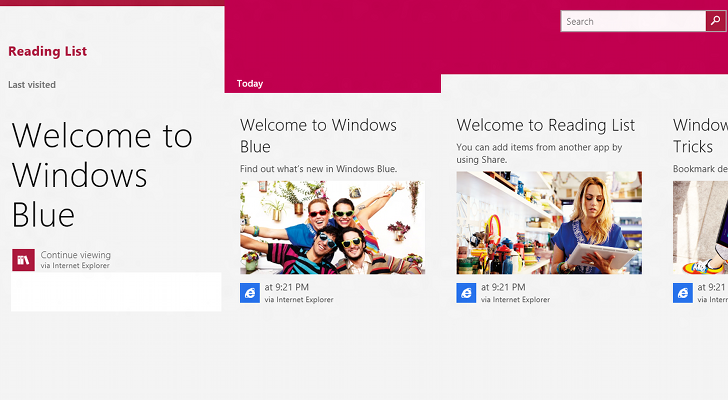
• READING LIST : new app in which you have article pages you want by example to read later, to add these web pages, go on a page in Internet Explorer, charms bar, Share, Share in Reading List.
• SKYDRIVE : includes same UI for "This PC" to show folders and files of your PC like on SkyDrive.
• WEATHER : similar to Windows 8 with a great weather map next of hourly forecast.
• BING SPORTS : new background (blue) for the app.
• HEALTH AND FITNESS : presented at Build Conference ; new tile color (orange, before purple). Allows to keep track on your weight, what you eat, etc.
• NEWS : similar to Windows 8, including a "Get started" to hand on News app features.
• ALARMS : new on Windows 8.1, can be used to announce an event of for waking up.
• CALCULATOR : new on Windows 8.1, a calculator in Modern UI.
• SOUND RECORDER : new on Windows 8.1, to record and save records in .wav format.

All the other updates are here.

Be here on October 18th to update Windows 8 to 8.1 !...
Read More …


"If you're going to San Francisco ..." sang Scott McKenzie ; on June 26th you can finish this sentence by "... you will see Windows 8.1 Keynote." And indeed, San Francisco is the city chosen to present Windows 8.1 preview, at the //build/ Conference, with Steve Ballmer, Antoine Leblond and Julie Larson-Green. New apps, new updates, new features, new devices and new opportunities for developers.

The full keynote is available below :


Apps - News, updates and improvements

Windows 8.1 integrates new apps in the same way as News, Finance and Travel :
• Food and Drink shows you collections of recipes, tips, techniques, chefs and photos/videos to follow and prepare easily good food.
• Health and Fitness allows you to keep track of your diet, weight, blood perssure, immunizations, etc.

• Reading list : shows a list of the websites you want to read later by the intermediate of Internet Explorer
• Alarms, Calculator, Sound recorder and Movie Moments are also included in Modern UI on Windows 8.1.


Some Windows 8 apps have been updated for the 8.1 version :
• Xbox Music : new interface which highlights your music collection and radios.
• Windows Store : new interface with a spotlight of most-used apps and apps you probably would install ; groups apps by theme and suggestions added in the app.
• Outlook (new name of Mail app) : a folder to show your newsletters ; a new Modern UI window opens when you click on a link in a mail.
• Maps : 3D imaging, 3D buildings and voice interaction integrated.
• Skype : you can answer to a (video) call directly on the lockscreen when someone call you.
• Internet Explorer : WebGL (3D support), MPEG Dash, possibility to show 2, 3 or 4 websites on your screen (depends of the screen resolution), sync of opened tabs between Windows 8.1 and Windows Phone, opening of an infinite number of tabs.
• SkyDrive : directly integrated in the platform ; possibility to synchronize all or a part of your folders and your files.

To see some of the news in the Windows 8.1 Preview, Zac Bowden made a first review on YouTube :


By the way, here's a list of the improvements for desktop and Modern UI presented by Julie Larson-Green and Antoine Leblond:

• Possibility to boot directly to desktop
• Start button is back (white Windows logo which shows your start screen)

• Possibility to show directly the list of Apps when you click on the start button
• Possibility to show 2, 3 or 4 apps by monitor (depends of your screen resolution)
• Possibility to move and resize the apps in your monitor(s)
• 2 new tile sizes : mini square (with icon only) and big square (shows you more infos in the tile)
• Slideshow of your pictures in the lockscreen
• Possibility to use your desktop wallpaper as start screen background
• Possibility to customize your startscreen (colors and background) directly from the right of your screen
• Possibility to move several tiles at once
• Access to Apps list by swiping from the bottom (with touch screens), or with the arrow at bottom left
• Apps list looks like Start menu but in full screen and more beautiful
• New search feature with Windows 8 apps and Bing integrated
• 3D Printing management available (only with a 3D printer machine)
• Miracast (the image of your tablet in your TV)
• Encryption of disks supported in all versions
• New versions of DirectX and Direct3D
• For developers, Visual Studio 2013 preview available here


Finally, is Windows 8.1 better than Windows 8 ?

Yes. We can see that Microsoft have followed some of the great sentences said by Windows 8 users, like the come back of Start button, Apps list and "unification" of desktop with Modern UI (for the Start screen especially). I can say that some of Windows 8 users already want to test it and enjoy new features and new possibilities to customize their PC.

For the moment, more than 100 millions of copies of Windows 8 have been sold in 8 months (note : Windows 8 was released 8 months ago on October 28th), which is a good number for Microsoft. The forecast : 150 millions copies in october (one year after Windows 8 release). Microsoft hopes that this update of Windows 8 will convince more people to use Windows 8, who (for some) though that they would lose their habits with Windows 7, the famous Start button and all programs list.


Now, download it !


All the languages, x32 and x64 versions are available by ISO files at this adress :

...
Read More …

All are in the pictures. Read them from top to bottom.
Hope you like it !

See the concept also on :


_______________________________________________________________


Wilfried Andral, founder and manager of DEwil. © 2013....
Read More …

____________