Even if this is a concept, fans of gaming will love it. Razer revealed on CES 2014 a modular PC called Christine. Its slogan : "Extreme PC Performance for Everyone".

The great advantage of this PC is its design. Of course, our eyes are first fixed on the green-illuminated base and the cooling central tower. However, the PC is divided into several modules that can be connected with drip-free connectors between modules and the central tower, and this in a few seconds. The modules could be hard drives, CD/DVD drives, differents ports for audio, video, USB, etc. You can upgrade and customize it very easily, such as GPU, CPU, RAM Memory ...

But how are these modules work ? Thanks to oil. Actually oil is circulating inside the modules and exchange heat with water running the central tower, here where you insert the modules.

Gavin Gear from Extreme Windows Blog was with Young Bae from Razer PC to speak about the performances of Project Christine, whose the video is below.


Notice that the PC has got a touch screen with UI, showing performances, CPU/GPU and also what OS you want to use (Windows as main example).

As a fan of gaming, like you, probably, I'll follow the news of the project, if a release will be announced or not. So the question is : do you want to have this kind of great PC ?

Sources : Extreme Windows Blog and razerzone.com...
Read More …


It is definitively an other level for Tablet PCs : Panasonic revealed world's first 4K tablet, the High-Performance 20” Toughpad 4K Tablet PC, whose the Performance model announced at CES 2014 in Las Vegas.

Available in Spring 2014, the Toughpad 4K Tablet Performance model is a big update of the Standard model. The Operating System used is still Windows 8.1 Pro, with the same display (3840x2560 / 10 million pixels LCD with LED backlightning and 10-point capacitive multi touch). Standard and Performance models have both Wi-Fi + Bluetooth, a HD 720p webcam with microphone, 2GB dedicated VRAM and 256GB SSD.


Performance model has several differences with the Standard :

- Intel Core i7 Processor, 2.1GHz with Turbo Boost up to 3.3GHz (Standard has Intel Core i5 Processor, 1.9GHz with Turbo Boost up to 2.9GHz) ;

- NVIDIA Quadro K1000M GPU (NVIDIA GeForce GT745M for Standard) ;
- 16GB RAM (8GB for Standard) ;
- Upgraded ports : 10/100/1000 Ethernet, mini-DisplayPort, USB 3.0, card reader and headphones ;
- Increased internal battery volume ;
- 5 MP rear camera added.

Windows revealed on Youtube a video in which Gavin Gear (from Extreme Windows Blog) and Kip Walls (director of product management at Panasonic) were at CES 2014 to present the two models of Panasonic 4K tablets and revealed the key differences between the two models.


Panasonic revealed on their official website all infos about Toughpad 4K tablet, with a page to compare speficications for Standard and Performance models. Full specifications for Performance model are available in PDF format here.

We don't know the price for the Performance model, however the Standard, announced in November 2013 and available this month in the US, costs $ 5,999.

Sources : Extreme Windows Blog, Panasonic and The Verge

...
Read More …


"If you're going to San Francisco ..." sang Scott McKenzie ; on June 26th you can finish this sentence by "... you will see Windows 8.1 Keynote." And indeed, San Francisco is the city chosen to present Windows 8.1 preview, at the //build/ Conference, with Steve Ballmer, Antoine Leblond and Julie Larson-Green. New apps, new updates, new features, new devices and new opportunities for developers.

The full keynote is available below :


Apps - News, updates and improvements

Windows 8.1 integrates new apps in the same way as News, Finance and Travel :
• Food and Drink shows you collections of recipes, tips, techniques, chefs and photos/videos to follow and prepare easily good food.
• Health and Fitness allows you to keep track of your diet, weight, blood perssure, immunizations, etc.

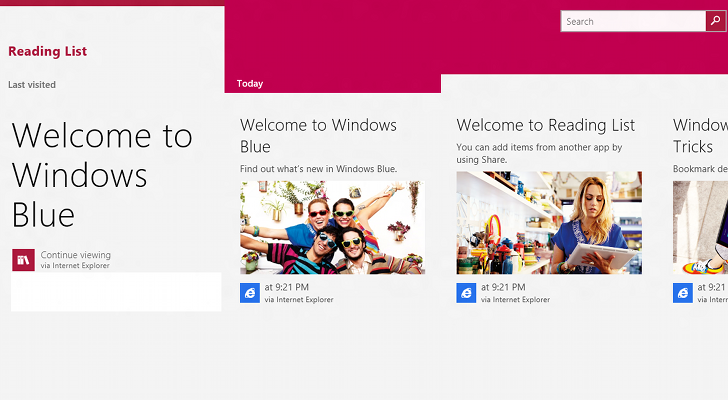
• Reading list : shows a list of the websites you want to read later by the intermediate of Internet Explorer
• Alarms, Calculator, Sound recorder and Movie Moments are also included in Modern UI on Windows 8.1.


Some Windows 8 apps have been updated for the 8.1 version :
• Xbox Music : new interface which highlights your music collection and radios.
• Windows Store : new interface with a spotlight of most-used apps and apps you probably would install ; groups apps by theme and suggestions added in the app.
• Outlook (new name of Mail app) : a folder to show your newsletters ; a new Modern UI window opens when you click on a link in a mail.
• Maps : 3D imaging, 3D buildings and voice interaction integrated.
• Skype : you can answer to a (video) call directly on the lockscreen when someone call you.
• Internet Explorer : WebGL (3D support), MPEG Dash, possibility to show 2, 3 or 4 websites on your screen (depends of the screen resolution), sync of opened tabs between Windows 8.1 and Windows Phone, opening of an infinite number of tabs.
• SkyDrive : directly integrated in the platform ; possibility to synchronize all or a part of your folders and your files.

To see some of the news in the Windows 8.1 Preview, Zac Bowden made a first review on YouTube :


By the way, here's a list of the improvements for desktop and Modern UI presented by Julie Larson-Green and Antoine Leblond:

• Possibility to boot directly to desktop
• Start button is back (white Windows logo which shows your start screen)

• Possibility to show directly the list of Apps when you click on the start button
• Possibility to show 2, 3 or 4 apps by monitor (depends of your screen resolution)
• Possibility to move and resize the apps in your monitor(s)
• 2 new tile sizes : mini square (with icon only) and big square (shows you more infos in the tile)
• Slideshow of your pictures in the lockscreen
• Possibility to use your desktop wallpaper as start screen background
• Possibility to customize your startscreen (colors and background) directly from the right of your screen
• Possibility to move several tiles at once
• Access to Apps list by swiping from the bottom (with touch screens), or with the arrow at bottom left
• Apps list looks like Start menu but in full screen and more beautiful
• New search feature with Windows 8 apps and Bing integrated
• 3D Printing management available (only with a 3D printer machine)
• Miracast (the image of your tablet in your TV)
• Encryption of disks supported in all versions
• New versions of DirectX and Direct3D
• For developers, Visual Studio 2013 preview available here


Finally, is Windows 8.1 better than Windows 8 ?

Yes. We can see that Microsoft have followed some of the great sentences said by Windows 8 users, like the come back of Start button, Apps list and "unification" of desktop with Modern UI (for the Start screen especially). I can say that some of Windows 8 users already want to test it and enjoy new features and new possibilities to customize their PC.

For the moment, more than 100 millions of copies of Windows 8 have been sold in 8 months (note : Windows 8 was released 8 months ago on October 28th), which is a good number for Microsoft. The forecast : 150 millions copies in october (one year after Windows 8 release). Microsoft hopes that this update of Windows 8 will convince more people to use Windows 8, who (for some) though that they would lose their habits with Windows 7, the famous Start button and all programs list.


Now, download it !


All the languages, x32 and x64 versions are available by ISO files at this adress :

...
Read More …

____________