“Why is it Windows 10? Because seven ate nine.”

Some people did this joke (me too). But we first thought that the name of the next version of Windows was also a joke. We were almost sure that it would be named Windows 9. Some guys thought about new names, like Windows One (because Xbox One, OneDrive, OneNote), but this version of Windows existed years ago. At final, no Windows 9, but Windows 10. Yes.

Revealed on September 30 in Los Angeles by Joe Belfiore, Windows 10 is only in its early build. But some (good) improvements have been made since Windows 8.1 Update 2.


Start menu officially back … and improved

The king of Windows 7 was the Start Menu, and it returns for desktop lovers on Windows 10. Of course, we have most frequent apps and all apps list. Search bar has been improved, showing file results and web results, as Windows 8.1 search charm did. User folders, as Documents, Pictures and Settings, are now above most frequent apps, and the shutdown/sleep button is on the top, next to user name.

The great new on this new Start menu is live tiles, next to apps list. Like on Windows 8.1 you can change tile size, move them where you want, pin and unpin tiles. And – cool feature – you can resize Start menu’s height by putting your mouse on the top border and dragging it up or down. According to the Windows 10 early build hands-on video by Zac Bowden (WinBeta), we can go from 2 to 8 rows of tiles, depending of your screen resolution.


Desktop and Modern UI on windows

A lot of desktop users also waited this feature, to have Modern UI apps, basically in fullscreen, on simple windows. Now it’s done. All the Modern UI apps of your system or downloaded in the Windows Store are like desktop programs: you can move and resize all app windows (width and now height). Minimize, maximize and close buttons are also here.


Task view, snap assist and multi-desktop

If you look left part of the taskbar, you’ll see two new buttons next to Windows icon: Search, for recent searches you did, and Task view. When you click on it, miniatures of all your opened windows are displayed on a row. Mac users will recognize the similarity with OS X’s Exposé feature.
Still on the task view, Windows supports now multiple desktops (feature we know on Linux Ubuntu). The miniatures of all your desktops are on a banner above the taskbar. No need to download a little program to have several desktops on your PC.

Between the snap feature introduced on Windows 7 and the task view, Windows 10 adds a new feature called Snap assist. By snapping a window on the left or on the right, a little task view appears next to the active window to ask to user what other window he would want to snap on this side. This feature supports up to four snapped windows on the screen.


Start screen closer to PCs and tablets using touch

Yes, what about touch? PCs and laptops including touch screen, tablets, Surface products? For lovers of touch and Modern UI, the Start screen is still here, with live tiles and apps. It includes now on the left something we already saw on the Start menu: user folders, most frequent apps and all apps list, linked to the apps list you know on Windows 8.1. Apparently, for PCs using touch plus mouse and keyboard, apps list and tiles on the Start screen are the same when we go on the Start menu, so both are synchronized. Then, people loving using the Start screen could naturally set Start screen by default when they click on the Start button. Note that these two versions of Start (menu/screen) will fit with all devices – PCs, laptops, tablets and probably Windows Phones with a new version), and so all screen sizes – from 4 inches to 80 inches.

Charms bar is still present and didn’t change since Windows 8.1. For search and settings, desktop fans will prefer using Start menu. People loving Modern UI still can use charms bar for searching and sharing what they want.


Command prompt … updated?

Here, no one waited that during Windows 10 demo. The command prompt, for typing commands on grey and old letters on black background, has given an update that its users wanted for years: paste text with Ctrl + V on the command line. We can also now copy, cut and select text using keyboard links. Font used is still the same, so any other update will be done for command prompt.


Conclusion: a good start for Windows 10

For this new version of Windows, Microsoft – very probably – found the way to attract Windows 7 and desktop lovers, especially with Start menu’s back (note the word play used for the conclusion’s title), and it’s not surprising that Windows 10 already received positive reviews. With the focus of desktop, enterprises will probably use more Windows 10 than Windows 8.1, and Windows 7 users – pros or kids - will not be lost with this version.

As old Microsoft CEO Steve Ballmer said on Build 2014, “When we brought out Windows 8 (then Windows 8.1), we talked about touch, touch, touch […] touch and more touch.” This time, we heard more the word “desktop” than “touch”. Touch isn’t dead, naturally, and we’ll continue to see touch on the next generations of smartphones, tablets, notebooks and ultrabooks.

Windows 10 will be the first version of Windows which will be the same on every platform (even smartphones with some edits). The technical preview version has been released for free on October 1st, and users downloading this preview can join the “Windows Insider” Program, a program where they receive updated preview versions of Windows 10 directly on their PCs.

We will have to wait next conferences to see more of Windows 10, especially at MWC and Build 2015, before its final release. Windows 10 will be integrated on smartphones and on the next generation of Microsoft Surface – Surface 4 or … 10? – coming next year. In the box of Windows 10 features we could add Internet Explorer 12, improved version of Visual Studio and more. With all this, Windows 10 could start next year a “battle” of sales against OS X Yosemite (revealed at WWDC 2014) and maybe new Chromebooks.

So, do you love Windows 10? Tell us what you like and what Windows 10 needs

Download Windows 10 Technical Preview (build 9841) on Windows website: preview.windows.com...
Read More …


After the success of Windows 8.1, Microsoft revealed that a first update, Windows 8.1 Update 1, will be released on March 11, 2014. Zac Bowden from WinBeta.org posted on February 3 a video about the pre-release version (build 9600) of the OS. A ride on the new features of the Update 1.

Already planned by many designers on deviantART (like on the Windows Desktop concept by Daniel Skrzypon), Windows 8.1 Update 1 introduces the possibility to pin your favourite Modern UI apps to the taskbar. After installing the Update 1, the Store app is pinned by default.

The Start screen as you can see on the top picture introduces two new buttons next to user name and picture : a search icon directly linked to the search charm, and a power button, waited by many users, to easily shut down, sleep restart the PC.

Microsoft thought of mouse users. If you have a mouse, you'll see by clicking right on a tile a context menu like on desktop, allowing you to resize, uninstall or unpin the tile.
Still for mouse users : you can see a title bar on Modern UI apps when you put the mouse on the top of the screen. On this bar, you have "minimize" and "close" buttons on the top right corner, to easily go back to the desktop or the start screen.

And a little update in PC Settings app : a link to the desktop Control Panel has been added in the bottom left corner.

All these updates have been shown in Zac Bowden's video on YouTube below.


We will update the post if we'll see other new features about Windows 8.1 Update 1, and you will be kept informed on social networks. For the moment no update has been viewed on the main Modern UI apps.

Ready to have this Update 1 on March ?...
Read More …


As you know, Windows 8.1 will officially be released on October 18th. You discovered in videos new tile sizes, new possibilities to customize your Start screen, the come back of the Start button, new apps and app updates. Zac Bowden from WinBeta.org released on September 5th a complete review of all the essential updates between Windows 8 and Windows 8.1.


Here is the list of these apps updates shown in the video :

• MAIL : new tile color (blue) ; possibility to move the mails received on folders ; social mails folder regrouping mails from Facebook, Twitter, Google ...
• CALENDAR : New home page showing in chronological order the next events.
• PHOTOS : similar to Windows 8 including photos from SkyDrive.
• XBOX VIDEO : Similar to Windows 8 but with dark grey background.
• XBOX MUSIC : New interface pushing your collections of music, including an explorer for millions of songs and a list of radios.
• STORE : New UI including popular apps in the left and "Picks for you" ; app info is now more complete, infos, screenshots, notes given, price, comments and so on
• SKYPE : now integrated to Windows 8.1 when you install the OS. Same features like on Windows 8.
• PEOPLE : New UI with last notification on the left, social updates, favourite contacts and contacts list.
• INTERNET EXPLORER : Tabs on the bottom when you click right, above address bar ; access in this part of the screen for Frequent, favourite websites and downloaded files.
• HELP AND TIPS : new app for Windows 8.1 to understand the main features and ways to use the OS.
• FOOD AND DRINK : presented at Build Conference at San Francisco on June ; an app for cooking, to discover new recipes, chefs and wines ; new tile icon.
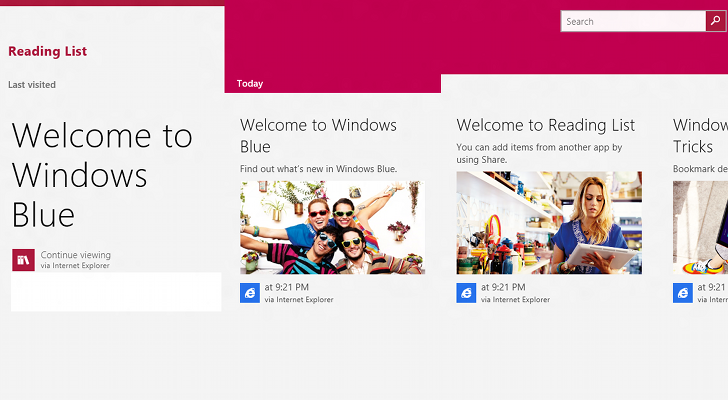
• READING LIST : new app in which you have article pages you want by example to read later, to add these web pages, go on a page in Internet Explorer, charms bar, Share, Share in Reading List.
• SKYDRIVE : includes same UI for "This PC" to show folders and files of your PC like on SkyDrive.
• WEATHER : similar to Windows 8 with a great weather map next of hourly forecast.
• BING SPORTS : new background (blue) for the app.
• HEALTH AND FITNESS : presented at Build Conference ; new tile color (orange, before purple). Allows to keep track on your weight, what you eat, etc.
• NEWS : similar to Windows 8, including a "Get started" to hand on News app features.
• ALARMS : new on Windows 8.1, can be used to announce an event of for waking up.
• CALCULATOR : new on Windows 8.1, a calculator in Modern UI.
• SOUND RECORDER : new on Windows 8.1, to record and save records in .wav format.

All the other updates are here.

Be here on October 18th to update Windows 8 to 8.1 !...
Read More …


"If you're going to San Francisco ..." sang Scott McKenzie ; on June 26th you can finish this sentence by "... you will see Windows 8.1 Keynote." And indeed, San Francisco is the city chosen to present Windows 8.1 preview, at the //build/ Conference, with Steve Ballmer, Antoine Leblond and Julie Larson-Green. New apps, new updates, new features, new devices and new opportunities for developers.

The full keynote is available below :


Apps - News, updates and improvements

Windows 8.1 integrates new apps in the same way as News, Finance and Travel :
• Food and Drink shows you collections of recipes, tips, techniques, chefs and photos/videos to follow and prepare easily good food.
• Health and Fitness allows you to keep track of your diet, weight, blood perssure, immunizations, etc.

• Reading list : shows a list of the websites you want to read later by the intermediate of Internet Explorer
• Alarms, Calculator, Sound recorder and Movie Moments are also included in Modern UI on Windows 8.1.


Some Windows 8 apps have been updated for the 8.1 version :
• Xbox Music : new interface which highlights your music collection and radios.
• Windows Store : new interface with a spotlight of most-used apps and apps you probably would install ; groups apps by theme and suggestions added in the app.
• Outlook (new name of Mail app) : a folder to show your newsletters ; a new Modern UI window opens when you click on a link in a mail.
• Maps : 3D imaging, 3D buildings and voice interaction integrated.
• Skype : you can answer to a (video) call directly on the lockscreen when someone call you.
• Internet Explorer : WebGL (3D support), MPEG Dash, possibility to show 2, 3 or 4 websites on your screen (depends of the screen resolution), sync of opened tabs between Windows 8.1 and Windows Phone, opening of an infinite number of tabs.
• SkyDrive : directly integrated in the platform ; possibility to synchronize all or a part of your folders and your files.

To see some of the news in the Windows 8.1 Preview, Zac Bowden made a first review on YouTube :


By the way, here's a list of the improvements for desktop and Modern UI presented by Julie Larson-Green and Antoine Leblond:

• Possibility to boot directly to desktop
• Start button is back (white Windows logo which shows your start screen)

• Possibility to show directly the list of Apps when you click on the start button
• Possibility to show 2, 3 or 4 apps by monitor (depends of your screen resolution)
• Possibility to move and resize the apps in your monitor(s)
• 2 new tile sizes : mini square (with icon only) and big square (shows you more infos in the tile)
• Slideshow of your pictures in the lockscreen
• Possibility to use your desktop wallpaper as start screen background
• Possibility to customize your startscreen (colors and background) directly from the right of your screen
• Possibility to move several tiles at once
• Access to Apps list by swiping from the bottom (with touch screens), or with the arrow at bottom left
• Apps list looks like Start menu but in full screen and more beautiful
• New search feature with Windows 8 apps and Bing integrated
• 3D Printing management available (only with a 3D printer machine)
• Miracast (the image of your tablet in your TV)
• Encryption of disks supported in all versions
• New versions of DirectX and Direct3D
• For developers, Visual Studio 2013 preview available here


Finally, is Windows 8.1 better than Windows 8 ?

Yes. We can see that Microsoft have followed some of the great sentences said by Windows 8 users, like the come back of Start button, Apps list and "unification" of desktop with Modern UI (for the Start screen especially). I can say that some of Windows 8 users already want to test it and enjoy new features and new possibilities to customize their PC.

For the moment, more than 100 millions of copies of Windows 8 have been sold in 8 months (note : Windows 8 was released 8 months ago on October 28th), which is a good number for Microsoft. The forecast : 150 millions copies in october (one year after Windows 8 release). Microsoft hopes that this update of Windows 8 will convince more people to use Windows 8, who (for some) though that they would lose their habits with Windows 7, the famous Start button and all programs list.


Now, download it !


All the languages, x32 and x64 versions are available by ISO files at this adress :

...
Read More …

All are in the pictures. Read them from top to bottom.
Hope you like it !

See the concept also on :


_______________________________________________________________


Wilfried Andral, founder and manager of DEwil. © 2013....
Read More …

____________